
Download Content Brief Generator – AI‑Powered SEO Brief Builder, Free & Secure
Overview
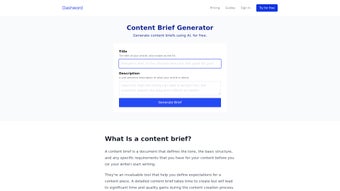
Dashword’s Content Brief Generator is an AI‑driven web app designed to turn the chaotic early stages of content planning into a crystal‑clear roadmap. Whether you’re a freelance writer, a content marketer, an agency, or an in‑house SEO team, this tool delivers a ready‑to‑use brief that includes a target‑audience profile, suggested tone of voice, detailed outlines, keyword clusters, and even examples of high‑performing content. By scanning the top Google results for your chosen topic, the generator extracts the most relevant keywords and semantic entities, saving you hours of manual research. The brief also respects geographic nuances, psychographic traits, and brand‑specific guidelines, ensuring that every piece of content resonates with the intended readers from day one. Because the platform runs entirely in the cloud, there’s no need for a bulky installation—just a secure login and you’re ready to generate briefs that accelerate collaboration and boost organic traffic. The intuitive UI, real‑time suggestions, and export options (PDF, DOCX, Google Docs) make it a practical addition to any content workflow, while the underlying AI guarantees that the output stays aligned with the latest search intent trends.
Key Features of the Content Brief Generator
- AI‑Enhanced Keyword Research: Automatically pulls the top‑ranking keywords from the first 10 Google results for your seed topic.
- Audience Profiling: Generates a concise description of the target audience, including demographics, interests, and psychographics.
- Tone‑of‑Voice Recommendations: Suggests the most effective voice (formal, conversational, technical, etc.) based on competitor analysis.
- Structured Content Outline: Provides a hierarchical outline with H2/H3 suggestions, word count estimates, and internal linking ideas.
- Competitor Snippet Samples: Shows real‑world examples of high‑ranking content to inspire your own writing style.
- Geographic & Language Settings: Tailors keyword clusters and audience data for specific regions and languages.
- Export Options: One‑click export to PDF, DOCX, or direct push to Google Docs for seamless collaboration.
- Version History & Collaboration: Track changes, leave comments, and assign tasks to team members within the brief.
- Secure Cloud Storage: All briefs are encrypted at rest and in transit, complying with GDPR and CCPA standards.
- Continuous Updates: The AI model is refreshed weekly with fresh SERP data, ensuring you always work with the latest insights.
Getting Started: Installation, Compatibility, Workflow, and Evaluation
Because the Content Brief Generator is a SaaS solution, it works on any modern operating system that supports a web browser—Windows 10/11, macOS Monterey and later, Chrome OS, as well as mobile platforms like Android 9+ and iOS 14+. No downloads or local installations are required; simply visit dashword.com/brief-generator and create a free account.
Step‑by‑Step Setup
- Sign Up: Click the “Get Started for Free” button, enter your email, and set a strong password. You can also use Google or Microsoft SSO for instant access.
- Verify Your Account: A verification link is sent to your inbox—click it to activate your profile.
- Choose a Plan: The free tier allows up to five briefs per month. Paid plans (Pro and Enterprise) unlock unlimited briefs, priority AI processing, and team collaboration features.
- Configure Settings: In the dashboard, set your default language, region, and preferred tone of voice. You can also connect your Google Drive for automatic export.
- Create a Brief: Enter a seed keyword or topic, select the target audience type, and click “Generate.” Within seconds, the AI presents a complete brief.
- Review & Refine: Use the inline editor to tweak outlines, add custom sections, or adjust keyword priorities. Team members can comment directly on each element.
- Export & Publish: Export the brief to your preferred format, share it with writers, or push it straight to Google Docs for real‑time collaboration.
Pros and Cons
- Pros:
- Fast AI‑driven research eliminates manual SERP analysis.
- Comprehensive audience profiling aligns content with user intent.
- Cross‑platform compatibility—works on Windows, macOS, Android, iOS.
- Secure cloud storage with GDPR compliance.
- Export options and team collaboration tools streamline workflow.
- Cons:
- Free tier limits the number of briefs per month.
- Advanced features (e.g., API access) are only available on higher‑priced plans.
- Heavy reliance on internet connectivity; offline usage is not supported.
Frequently Asked Questions
Is the Content Brief Generator truly free to use?
Yes, Dashword offers a free tier that allows up to five briefs per month. This is ideal for freelancers or small teams testing the tool. For unlimited briefs and premium features, you can upgrade to a paid plan.
Can I integrate the brief generator with my existing CMS?
While there is no direct plugin, you can export the brief as a Google Doc or PDF and then import it into any CMS (WordPress, Contentful, HubSpot, etc.). The API available on Enterprise plans also enables custom integrations.
How secure is my data on Dashword’s platform?
All briefs are encrypted both at rest and in transit using TLS 1.3. Dashword adheres to GDPR, CCPA, and ISO‑27001 standards, ensuring that your proprietary research stays confidential.
What if I need more than the free tier’s five briefs per month?
You can upgrade to the Pro plan for $29/month, which offers unlimited briefs, priority AI processing, and advanced collaboration tools. Enterprise pricing is custom‑quoted for larger teams.
Does the tool support languages other than English?
Yes, the generator currently supports Spanish, French, German, Portuguese, and Dutch. Additional languages are being added as the AI model expands.
Conclusion – Why You Should Download the Content Brief Generator Today
In a landscape where content quality and relevance directly affect search rankings, the Content Brief Generator by Dashword gives you a competitive edge by automating the most time‑consuming parts of the brief‑creation process. Its AI‑backed keyword research, audience insights, and structured outlines ensure that every piece of content starts with a solid foundation. The tool’s cross‑platform accessibility, secure cloud storage, and collaborative features make it a natural fit for freelancers, agencies, and in‑house teams alike. Even the free tier provides enough power to test the workflow, while the affordable Pro plan scales effortlessly as your content demands grow. If you’re looking to streamline brief creation, reduce research overhead, and improve the relevance of your SEO content, downloading the Content Brief Generator is a logical next step. Click the button below to start your free trial, generate your first brief in seconds, and experience the productivity boost for yourself.
Pros: Fast AI research, comprehensive audience profiles, secure cloud storage, seamless export.
Cons: Limited free briefs, no offline mode, advanced features locked behind paid plans.



.png)



